
2026
A cleaner book page
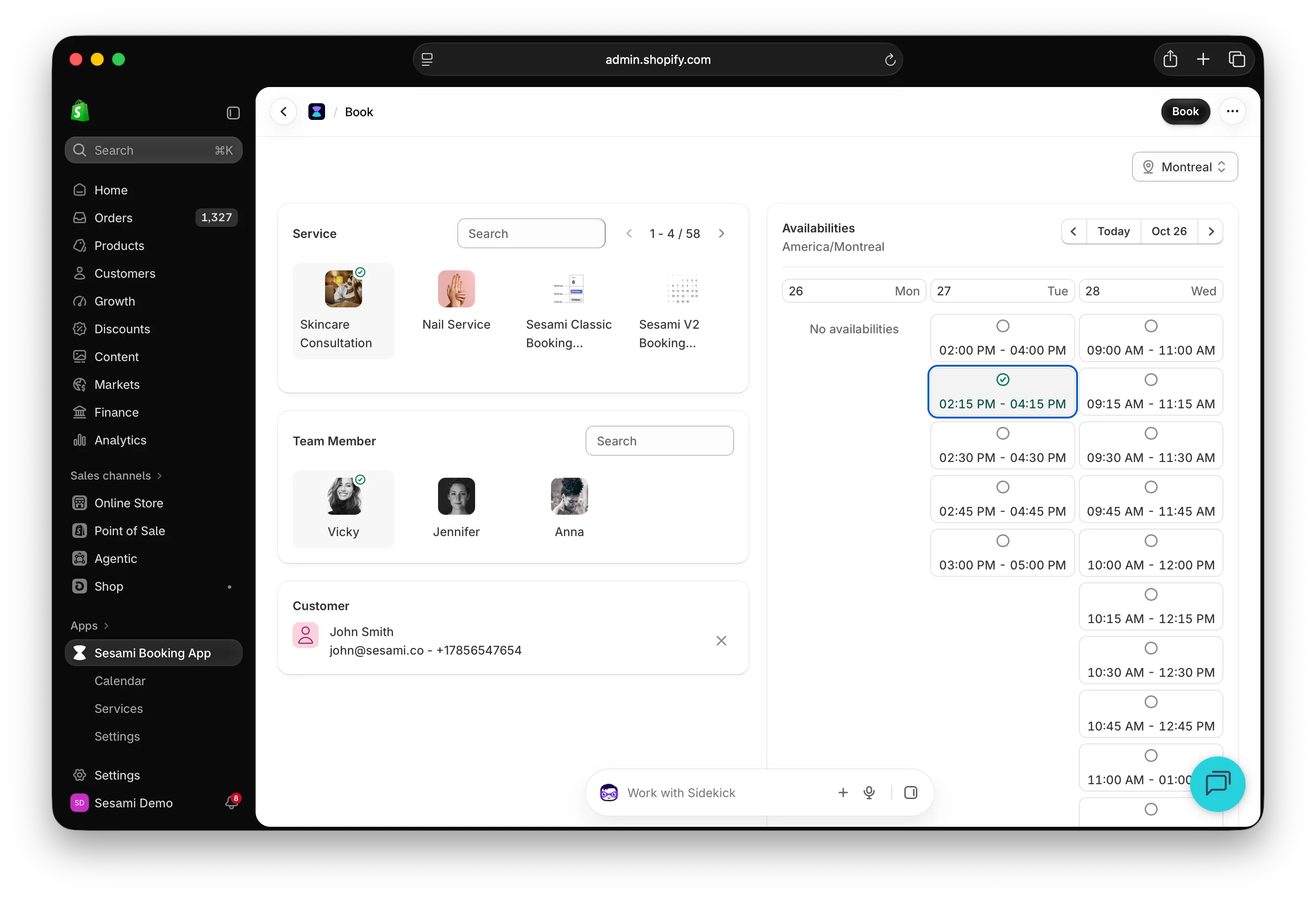
Booking on behalf of a customer is quicker to scan. Compact headers, a clear mark on the service, resource and time you’ve picked, and a proper dropdown for switching location.
A faster Shopify app
The app opens faster and responds quicker throughout. Analytics charts hold their place while they load, so the dashboard no longer shifts under you.
Dutch and Turkish
Sesami now speaks Dutch and Turkish, across the storefront booking flow, the Admin Portal and the Shopify app. Customers can book in their own language.
Booking notes
Add notes to any booking: a preference, an allergy, a reminder for whoever is on shift. Each note shows who wrote it, so the whole team stays on the same page. To turn on booking notes for your shop, email help@sesami.co.
Print your calendar
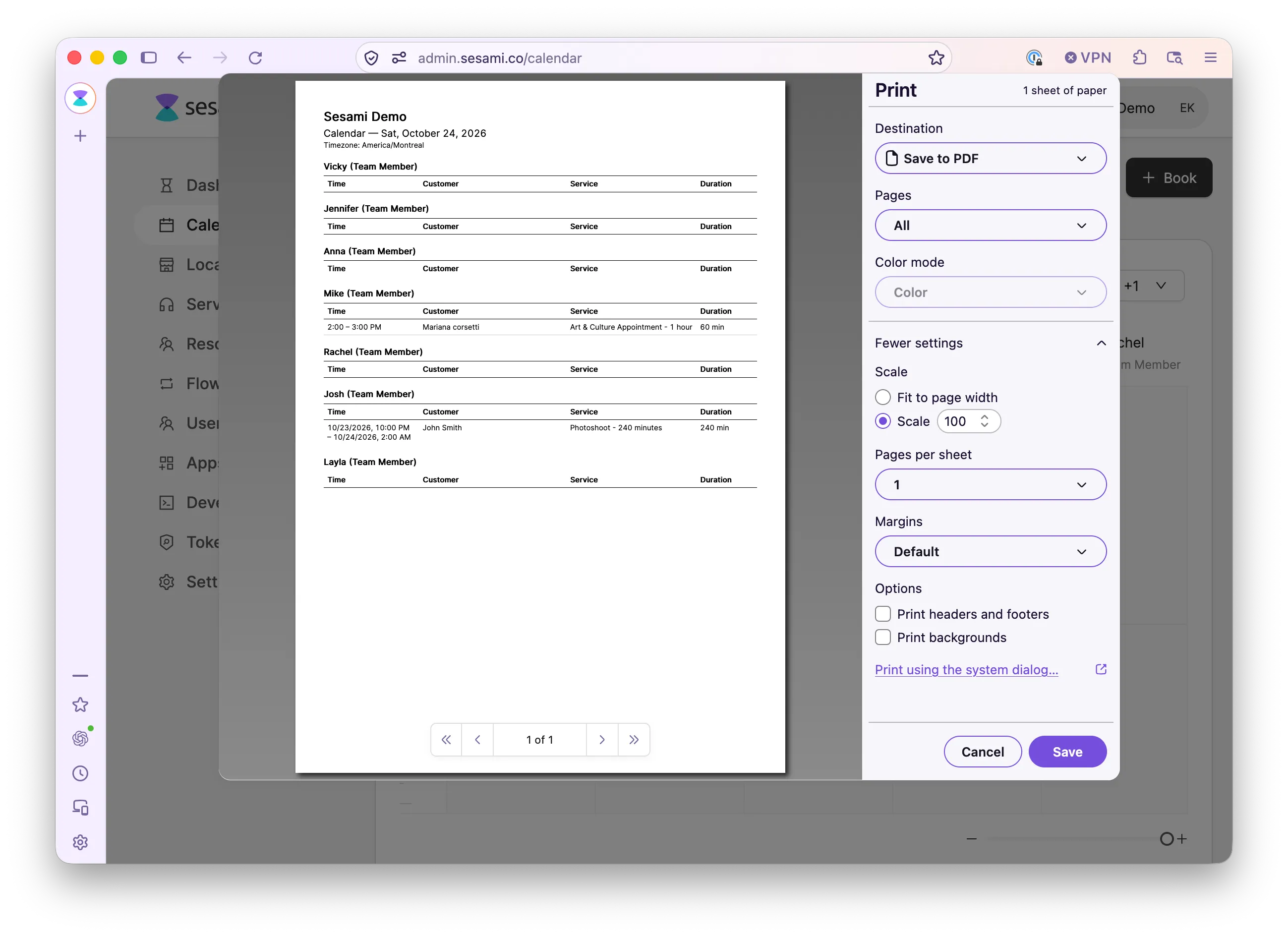
Print the calendar from the Admin Portal for the front desk or the day’s team briefing. Each resource gets its own list of the day’s bookings, with the time, customer, service and duration. Group bookings print one line per booking, with the quantity.
Richer booking details
Booking details now show the service variant the customer picked, link straight to the Shopify order, and mark checked-in and no-show bookings with a badge.
The all-new Sesami app for Shopify
A ground-up rebuild on Shopify’s current APIs and SDKs. The daily work now lives in the Shopify admin: a dashboard with bookings and sales side by side, upcoming bookings you can act on without leaving the page, a calendar with day, week and list views, and service creation that deep-links into the native product editor.
Deeper configuration moved to the Admin Portal, reachable from the app with one click. Resources, buffer times, group bookings, Google Calendar sync, Flows, users and API tokens all live there.

The new Help Portal
The Sesami Help Portal is live at help.sesami.co, with updated documentation, step-by-step guides and a faster way to find answers. It has AI assistance connected to the relevant MCP servers, and support is reachable from the same place.

Booking and calendar fixes
Fixed check-in and no-show permissions and labels. Fixed handling of expired sessions in the Admin Portal. Improved phone number validation.
Customer management
Manage customers directly from the Sesami Admin. Create, view and edit customer records, all tied to your booking data.
More round-up intervals
More flexible round-up interval options for services, giving you finer control over how times are shown to customers.
Multi-location analytics
Dashboard analytics now filters by location, so you can see how each of your locations is doing on its own.
Status page
Sesami has a dedicated status page so you can monitor platform availability in real time.
Admin Portal enhancements
An all-locations view in the calendar, higher resource selection limits, better cache management, and subscription expiry handling.
Booking button loading state
The Sesami button shows a loading indicator while it waits for configuration, so the storefront no longer flashes.
Cart verification
The booking experience verifies cart items against real-time availability before checkout, which means fewer failed bookings.
New storefront service
A brand new storefront service now powers the booking experience on your online store, with better performance, better caching and more reliable availability data.
Event-driven cache invalidation
Update your shop settings, services, locations or resources and the storefront cache clears itself, so customers always see current availability.
Language support
Added Dutch (nl-NL). Better locale fallback, so an unsupported locale falls back to the shop default rather than breaking.
Storefront performance
Major performance work on storefront configuration loading: fewer database queries, more efficient caching, faster pages for your customers.
2025
Booking experience fixes
The add-to-cart button is now disabled on an invalid date or time. Services without images are handled properly. Clearer reset messaging when the form changes.
Calendar timezones
The admin calendar shows booking times in the selected location’s timezone, which matters most if you operate across several.
Stability
Error boundaries mean the app handles unexpected errors rather than crashing. Better phone validation errors, and translation fixes across several languages.
Booking flow improvements
Choose whether to stay on the booking page or go to the calendar after booking. Slot cache refreshes automatically after a booking. Booking ID is visible in the details sidebar.
Button reset
The booking button resets properly when customers change product variants or form fields, so stale booking data cannot be submitted.
Dashboard analytics
The Sesami Admin now has a dashboard with total bookings, top services and sales, with currency formatting and filtering by location.
Add to cart and skip cart events
New events fire when a customer adds a booking to the cart or skips it, which makes analytics and custom storefront logic much easier.
Admin improvements
A read-more option on the resource configurator, the current user shown in the admin, version switching behind feature flags, location-based address search, and the ability to change a service location.
Report service v2
A rebuilt report service with location-based filtering, timezone support and better data accuracy.
Error monitoring
Sentry is integrated across the Admin Portal, the booking experience and the Forms app, so issues are caught and fixed faster.
Permissions
Role-based permissions for your team. Control who can do what, from viewing bookings to managing services and locations.
POS upgrade
The point of sale experience is on the latest version, with fixes to add-to-cart.
Admin Portal enhancements
Location management shown or hidden based on your plan, improved side menu navigation, better handling of location-based resources, and sensitive data hidden in error reports.
Availability and calendar fixes
Fixed available ranges in the admin calendar, and report generation with date range filters.
Round images
Fixed image rendering for resources using circular avatars in the booking experience.
Shared caching infrastructure
Shared caching deployed behind the scenes, improving performance across every Sesami service.
Unsaved changes warning
The Admin Portal warns you before you navigate away or close the tab with unsaved changes.
New booking flow
The admin booking flow is redesigned: book, create draft order and complete now happen in a modal rather than separate pages, and you stay on the same page afterwards.
POS multi-resource and multi-location
The Shopify POS integration fully supports multi-resource and multi-location setups, matching online booking.
Rescheduling
Customers can reschedule from the storefront. The Admin Portal reschedules through the same booking modal, so both sides work the same way.
Apps platform and API updates
Released the Apps API with target support, plan review limits, resource timezone support, and updated authentication for protected APIs.
Calendar refinements
Removed the per-slot participant count to cut backend overhead, fixed overlapping buffer slots, and aligned resource types in the calendar header.
Calendar timezone display
The calendar shows the timezone in its header, and resource ranges display in the selected location’s timezone.
Admin Portal improvements
Removed the storefront start date option for a simpler setup, added new flow variables for automations, fixed booking customer filtering, and improved calendar resource search.
Denser calendar
The timeline calendar is more compact, so you can see more bookings at a glance.
New Shopify POS tiles
Shopify deprecated the older integrations built on POS cart links, including the previous Sesami tiles. Sesami now ships two new tiles, and the calendar tile is available again.

Booking without an order
Create bookings in the admin without requiring a Shopify order, which is what walk-ins and manual bookings needed.
Multi-location interface
A full multi-location interface: switch between locations, view location-specific calendars, and manage resources per location.
Multi-resource and multi-location
One of the biggest releases: multiple resources and multiple locations per shop. Assign team members and resources to specific locations, manage availability per location, and let customers choose where before they choose when.
Admin Portal updates
Optional fields are labeled as optional, new booking flow translations, and Dutch (nl-NL) locale support.
Email validation
Better email validation across the booking experience and the Forms app.
Location ID as a tag option
Location IDs can be used as tag options in your storefront, which makes product-to-location mapping more flexible.
Experience version override
Override the calendar experience version directly in your theme code, using the experience attribute on the Sesami component.
New build system
The booking experience is rebuilt on a new build system, improving load performance and reliability.
Sesami Forms app
Create custom intake forms for your booking flow and collect what you need from a customer before their booking.
2024
Apps platform
App domain and redirect URIs are now required, permissions have a better management UI, and API responses for app permissions are cleaner.
Book tile
A booking tile component that shows booking options in a card layout on your storefront.
Multiple buttons and headless pages
The booking experience supports several booking buttons on one page, and headless page configurations.
Automatic translation
The booking experience translates into your customer’s language automatically, across a wide range of locales, including Chinese calendar formatting.
Sesami Analytics
The first version of Sesami Analytics, with booking insights and reporting inside the platform.
Shared cloud infrastructure
Migrated to shared cloud infrastructure, which is the foundation for the performance and reliability work that followed.
The new Admin Portal
The first version of the rebuilt Sesami Admin Portal, with a modern interface and better performance.
Save draft order
An adjustment to bookings without orders: the draft, order, book workflow is available again for merchants who need the order created up front.

New Sesami tiles for Shopify POS
New tiles built on Shopify POS UI Extensions, following current Shopify standards. It is the most native and fastest way for store staff to manage bookings at the counter.

Bookings without orders
Take a booking without creating an order first, on the online store and on Shopify POS. This is what makes the online-to-offline journey work: reserve now, settle at the counter.

Remaining slots on group bookings
Group bookings now show how many places are left in each time slot, so a customer can see a class filling up.

Hide the 'Any available' option
You can hide the “Any available” choice when a customer picks a team member, so they choose a specific person. Set it in Shopify admin under Online Store, Customize, the Shopify product template, then the Sesami booking button.

A simpler trial
Install Sesami and you get a 30-day trial on the highest plan, with no payment, no card and no plan to choose first. Booking a free onboarding call is now a button in the welcome email and on the dashboard.
2023
Automatic language detection
Sesami now follows the language a customer picks on your storefront, with no code changes. Previously it rendered in whatever language was set in Sesami settings, and supporting a multi-language store meant asking our team for help.

2022
The v2 calendar
Our new booking calendar, released in closed beta. An original design rather than another scheduler clone, and the foundation for everything the booking experience does now.

Instant Booking, in beta
Enable Instant Booking on any service and let customers book without going through Shopify checkout.

Sesami Flows and the Klaviyo integration
A new way to manage notifications: schedule messages to be delivered by Sesami, by Klaviyo or by another marketing app, and use webhook trigger actions to push booking data into your own systems. This is what custom booking journeys are built on.
